Saturday, March 30, 2013

Kindle Fire (2nd Generation) and Kindle Fire HD 7" / 8.9" software update

Amazon has just updated the software for Kindle Fire (2nd Generation), Kindle Fire HD 7" and Kindle Fire HD 8.9". With 5 new features added to both 7" models, there are only 4 features for HD 8.9".

New features for Kindle Fire 2nd Generation (v 10.3.0) and Kindle Fire HD 7" (v 7.3.0)


1. X-Ray for textbooks supported
Access to all important definitions, concepts, terms, etc. in the textbooks.

2. Simplified Chinese supported

3. Track reading progress with Time to Read
Figure out when you will finish a book / chapter according to your current reading speed.

4. Kindle editions with Audio / Video supported
Kindle books with Audio / Video clips included are supported on Kindle Fire tablets now.

5. Print replica textbook enhancements
Thumbnails are displayed at the bottom of each page for fast preview / selection. Easy to take notes.

New features for Kindle Fire HD 8.9" (v 8.3.0)
The same to above (expect for #1).
According to the additions, it's easy to find that Amazon is endeavoring to turn Kindle Fire tablets into better tablet-like readers, which are eventually able to stand out among the peers, since reading eBooks on current Kindle Fire is not that better than reading on Kindle for Android app. A case in point is that many people think that as a professional Android eReader, Kindle Fire should be able to read eBooks aloud, but that's not the truth. On the contrary, there are free Android reading apps delivering more powerful functions, such as Mantano.

The updated software has taken more reading-related practicality, functionality and usability into consideration, which is indeed good news to Amazon Kindle patrons, especially to college students. With the    inclusion of Simplified Chinese together with the upcoming acquisition of Goodreads, Amazon's ambition in global eBook market is in front of us as clear as crystal.

Thursday, March 28, 2013

Rejuvenate Your Reading Experience With These Android E-Book Apps

Android has largely captured the mobile application market and with its new e-book applications, this wonderful operating system is creating place in the hearts of avid readers and writers as well. Book reading is an enticing hobby pursued by a large number of people. Traditional way of reading books and novels is passe and people are now hooked to their smart phone or tablet to read a book. In this scenario, Android has made tremendous efforts to create stunning e-book apps. There are some of the best applications available in Android app Store that allows users to read their favorite books or novels while they are on the go!

Let’s take a look at some of the applications that are being increasingly downloaded and extensively used by most Android users.

Kindle for Android

Kindle ebook reader is highly preferred by those who love to spend their leisure time while reading. Do not worry if you don’t have this widely accessed reader! Now Android has come up with its amazing e-book app called ‘Amazon Kindle’ that gives you the opportunity to read kindle books even if Kindle ebook reader is not installed on your smart phone. However, you can use both the applications to read your favorite book on your Android device. Downloading the application is also quite simply. Simply install the ‘Kindle’ app on your smart phone powered by Android 6.0 or higher version.


Sony for Android

This is one of the newest E-book app available on Android that comes preloaded with the excerpts from the 3 bestsellers in the world of ebooks and is also laden with 3 classic titles. Reading position sync, highlighting and bookmarking are some of the features of this wonderful app. Sony Reader app is supported by Android 2.2 and higher versions.


Nook for Android

Like other ebook apps on Android, this application also allows the users to read Noble Nook books without installing the reader. What is unique about this app is that user can also lend his favorite book using the ‘LendSoftware’ available in the app. This helps the reader to check out the book prior to its actual purchase. Barnes and Nobel Nook app is supported by Android 1.6 and higher versions.


Aldiko Ebook App

Slightly different from other ebook apps, the Aldiko Ebook app gives you the opportunity to read books from different ebook stores selling EPUB ebooks or Adobe PDF files. You can even get your content published into an ebook. Additionally, a full ebook can be downloaded on your smart device without involving the use of your computer system.


Kobo E-reader

The vast e-book listing on Kobo E-reader app is amazing as far as ebook reading is concerned. You can buy your favorite book and download it on your device for reading on the go.


All the aforementioned e-book Android applications can either be downloaded by scanning the bar code from your device or you can search for them on the Android marketplace. Different versions of Android operating system are required for each application. Keep this in mind when installing the above readers on your Android device.


This article has been brought to you by Jason Roiz, a skilled and professional programmer working with OSSMedia, a joomla development company, providing outsourcing services to those businesses that are looking to hire joomla Developers.

Sunday, March 24, 2013

Will Microsoft Surface smartphone be a threat to Nokia?

Microsoft has dominated the whole personal computer market for years with its Windows operating system while it has struggled in the mobile industry. Nokia was the undisputed leader in cell phones shipments, but has been less successful as the market has shifted to smartphones.


Although Windows Phone OS has existed in the market for quite a long time, people rarely choose WP phones. When they consider the quality and quantity of WP apps, they find the apps are nowhere near the quality of quantity of Android or iOS. As to Nokia, it has finally released smartphones that can compete with the leaders, but now has to play catchup and has had only marginal success so far.

Nokia’s phone operating system, Symbian, has been discontinued and is not longer a factor in the marketplace. Instead of producing an Android phone, Nokia joined with Microsoft to produce Windows Phones. However, when Nokia while Nokia has dedicated itself to Windows Phone and produced the Numia 920, Microsoft is now rumored to be about to launch its own Surface smartphone.

Compared to Android and iOS, Windows Phone has been unable to get a significant share of the smartphone marketplace. Before the release of the Lumia 920 last year, Apple’s iPhone and Android smartphones combined had 87% market share in the US while Windows Phone only took up a about 2%. 


By the first quarter in 2013, WP has taken up 5% proportion of global phone sales, which is far less than that of its competitors.


Will Microsoft Surface smartphone be a threat to Nokia? Many people think so. If MS releases its own Surface smartphone, most analysts believe it will be taking market share away from it’s own partner, Nokia.

However, we can also view it from another angle. Compared to Android and iOS, the Windows Phone market is still new and a strong leader can influence the direction it goes. Instead of a rival, Microsoft is more like a new member in WP camp, which is able to make WP market bigger and better together with Nokia and other WP manufacturers. and other WP manufacturers.

Wednesday, March 20, 2013

How to get books with Kindle Fire

With its convenience and good reading experience,the Kindle  Fire has become a very popular handset for many people.As a electronics,the Kindle Fire may be not friendly or easy-use to some people,especially the old aged.They could be confused about how to  get books with this gadget—just think about the traditional paper reading in which we just pick a book as you want at a bookstore .So here comes the topic to teach you how to get books with a Kindle Fire!

There are two methods for you to get books with a Kindle Fire:
1.To get books at Amazon official site
2.To get books via the built-in "Store"application on your Kindle Fire

Before starting our tutorial,make sure that you already have a Amazon account and get the Kindle For PC suite installed on your computer.Click here to register a Amazon account and set your payment method and click here to download Kindle For PC.

Finshing register?Let's get started!

Get books at Amazon official site

1.Log in the website
  Type www.amazon.com in your address bar of youre browser

  Click Sign in to log in
 

2.Choose your books
Select the Kindle Books Category

Choose the books you like.If you're looking for a specific book, enter a few words into the search box and you"ll see all the matching results. To better your results, try restricting your search to a particular type of product category in the drop-down menu.If you want to browse a category, just take a look at  the lef-side menu.

For example,we choose the category "Advice&How-to",and you can see all the books of this field sorted by a default  category,mostly"New and Popular".

You can change the sort by clicking the pull-down menu on the  right.

Choose a book you like and it will turns to the detailed page.We can see the detailed information of the book and comments from other customers.

3.Click To Buy
When you confirm the details of the book you choose,you can just buy it for just one click!Find the orange button which shows"Buy now with 1-click" on the right.Choose one of the three ways of delivering:

a.Deliver to your Kindle:Your Kindle Fire will automaticly download the book.Meanwhile the Kindle For PC also archive the book but you need download it manually.
b.Deliver to you Kindle Cloud Reader: A new page will generate on your browser to show you the content of the book.Meanwhile both your Kindle Fire and Kindle For PC will archive the book  and you must start downloading manually.
c.Deliver to your Kindle For PC:Your Kindle For PC application will automaticly download the book.Meanwhile the Kindle Fire also archive the book but you need download it manually.

When you click the button,a notice will show up to prompt you to select a payment method.Just enter your payment information.Then click Place your order button on the right.

4.Read your books!
Just wait for the downloading finished and then you can enjoy your reading on the Kindle Fire!

Get books via the built-in Store

1.Log in  your Kindle Fire
Tap the tiny setting icon at the top of your screen to callout the menu.Select "More"and"My Account" option in turn ,then log in with your account.


2.Get access to the built-in store
Select the "Books"option on the main interface,clik "Store"option on the top right corner to enter the built-in store.

3.Choose the books you like
The built-in store is not exactly the same as the official amazon store.It's more simple and eay-to use.You can type some words to search a book on the top search box, or just browse from categories onthe right-side menu.

4. Click To Buy
When reaching to the detail page of a book,you can buy the book by clicking the orange button which mark the price.The book will be downloaded when you eneter and confirm the payment information.
If you don't make sure that this book is good for you,click the "Try a sample" button.The Kindle Fire will start to download few pages of this book.You can read the sample pages to make your final choice.

5.Read your book
Just wait for the downloading finished and then you can enjoy your reading on the Kindle Fire!

Ok,our tutorial has finished!As you can see,it's very simple and easy.Do you get help from this article?For more guidance,please visit Amazon.com Help.

OfficeSuite Pro 7 + (PDF & HD) for Android

OfficeSuite Pro 7 + (PDF & HD) for Android - Follow this article to free download OfficeSuite Pro 7 + (PDF & HD) for Android.

OfficeSuite Pro allows you to view, create, edit, print and share Word, Excel and PowerPoint files on the go. You can also open attachments and see PDF files on an Android based phone or tablet with our feature-rich mobile office solution. OfficeSuite Pro includes a File Browser and integration with Cloud service leaders: Box, DropBox, Google Drive, SkyDrive and SugarSync to give users a multitude of options on how to manage files and attachments. In here you can download OfficeSuite Pro 7 + (PDF & HD) for Android for free.

OfficeSuite Pro 7

OfficeSuite Pro 7 + (PDF & HD) for Android


Feature:
* New and improved UI
* Side bar navigation in the File Browser for quick access to different folders and remote third party cloud services
* Templates - OfficeSuite Pro 7 users can benefit from a wide range of templates, from Resume and Invoice templates to Travel Planner and Weight Loss Tracker templates, among others
* Extended Cloud support - now compatible with Microsoft SkyDrive. Google Drive support has been improved, by adding folder support, thus allowing for optimized document view
Docs Editor:
* Styles - apply MS Word styles or styles used in the document
* Table design – ability to fashion an inserted table as per our library of tailor-made designs
* Formulas (display only)
* Format painter
Spreadsheet Editor:
* Improved selection of parameters in functions
Slides Editor:
* Animations
PDF Viewing:
* A new PDF engine using library from Adobe, providing instant opening of large PDF files
* Find/Find Next
--File Formats Supported--
* Text format - DOC, DOCX, DOCM, RTF, TXT, LOG
* Spreadsheet - XLS, XLSX, XLSM, CSV
* Presentation - PPT, PPTX, PPS, PPSX, PPTM, PPSM
* Other formats - PDF, EML, ZIP
--Easy File Access and Sharing--
* With the integrated File Browser you can easily access, modify and share your local or Cloud stored files. OfficeSuite integrates with Google Drive, DropBox, Box, SugarSync and SkyDrive
* Easily open email attachments
* Work with Outlook EML files
* Share documents via Email or Bluetooth
--Intuitive and Intelligent Design--
* OfficeSuite 7 comes with new intuitive design and user experience allowing quick and intuitive workflow while you manage your files or create and modify documents.
* New side bar gives instant access to local and cloud stored files.
* Two-finger zoom, multi-touch support, context toolbars and popup menus make your work with OfficeSuite quick and fun.
--OfficeSuite Extensions--
* QuickSpell – fully integrated with OfficeSuite Pro QuickSpell will help you dramatically improve your typing accuracy.
* Font Pack – allows you to use Microsoft most used fonts in OfficeSuite text documents.
* Note that OfficeSuite Extensions are sold separately. Purchasing any of the extensions is optional.

Notes:
  • Version: 7.0.1186
  • Size: 19 MB
  • Required: Android 1.5 and up
Download:
OfficeSuite Pro 7 + (PDF & HD) for Android (18,8 MB)
OfficeSuite Pro 7 + (PDF & HD) for Android on Google Play Store

Where's My Water? 1.11.0 for Android

Where's My Water? 1.11.0 for Android - Follow this article to free download Where's My Water? 1.11.0 for Android.

Where’s My Water? is a challenging physics-based puzzler complete with vibrant graphics, intuitive controls, and a sensational soundtrack. To be successful, you need to be clever and keep an eye out for algae, toxic ooze, triggers, and traps. In here you can download Where's My Water? 1.11.0 for Android for free.

Where's My Water


Where's My Water? 1.11.0 for Android


Feature:
1. SWAMPY’S STORY
Swampy the Alligator lives in the sewers under the city. He is a little different from the other alligators — he’s curious, friendly, and loves taking a nice long shower after a hard day at work. The other alligators have damaged his plumbing and disrupted the water flow. Help Swampy by guiding water to his shower! In Swampy’s Story, play ten themed chapters over 200 levels. Collect Swampy’s ducks and shower items to unlock new puzzles and bonus levels.

2. CRANKY’S STORY
Cranky is the toughest alligator around and he has worked up an appetite from sabotaging Swampy’s water supply. He eats anything, especially all the rotting and disgusting junk found in the dumps and sewers. Cranky will not eat vegetables however, and now his food is covered with vegetable-like algae. Use the dirty purple water to clean off Cranky’s plate so he can eat! Cranky is tough and so are his puzzles! Try five levels for free and test your skills with more than 80 levels for an additional in-app purchase.

3. LOST LEVELS
This collection of levels from Swampy’s other adventures is always growing, and always FREE!

4. MYSTERY DUCK LEVELS
These levels may look familiar, but in the Mystery Duck Story you have to collect all new types of ducks including:
• MegaDuck – The biggest duck of all, he needs more water than ever to collect!
• Ducklings – Sure they look cute, but they are everywhere!
• Mystery Duck – He moves! Timing is everything to catch this fancy teleporting duck!
New story, new comics, new look and new ducks – a new way to play for a small additional price! Try five levels for FREE!

5. LEVELS OF THE WEEK
More levels - EVERY WEEK! Now you can expect 3 BRAND NEW LEVELS to be delivered into Where's My Water each week. That's right - 1 new Swampy, Mystery Duck and Cranky level per week for FREE! But make sure you play every week because once these levels expire, they may be gone for good!

6. AMAZING LIFELIKE FLUID PHYSICS
Go with the flow! Swipe, slosh, and splash to guide fresh water, dirty water, and ooze through increasingly challenging scenarios.

Notes:
Requires Android 2.1 and up

Download:
Where's My Water? 1.11.0 for Android (47 MB)
Where's My Water? 1.11.0 for Android on Google Play Store

Street Fighter 4 HD for Android

Street Fighter 4 HD for Android - Follow this article to free download Street Fighter 4 HD for Android.

Street Fighter 4 delivers the first true fighting game on Android. This uncompromising fighter features all the visceral thrills, fantastic graphics and brilliant game play that are hallmarks of the series. In here you can download Street Fighter 4 HD for Android for free.

Street Fighter 4

Street Fighter 4 HD for Android


Long time Street Fighter fans can jump into the action and have an instant familiarity with the controls. For more casual players Street Fighter 4 features numerous settings and tutorials that put you on the path to world warrior.

Feature:
not found.

Notes:
  • Version: 1.00.00 New cracked
  • Size: 26 MB
  • Required: Android 2.3 and up
Download:
Street Fighter 4 HD for Android (26,3 MB)
Street Fighter 4 HD for Android on Google Play Store

Sunday, March 17, 2013

How to save a Google doodle animation on your computer

Today's Google doodle animation, "St. Patrick's Day" is so cute that I am eager to save it on my computer. As what I have done on other pics, I right-clicked the pic and selected "Save as...", but can only save as "htm" webpage. There was no option to save as a GIF or something like that.


Next, I right-clicked Google's homepage again, selected "View page source", and searched for (Ctrl + F) "gif" among the dense codes. 0 result. Only to find a very small PNG pic, less than 100*50 pixel and many obscure scripts. Apparently, Google's doodle animation is not based on a traditional GIF pic.

I then searched on the Internet and found some results about Firefox browser. However, I mostly use Google Chrome thus it does not work for me. Here is the solution for Firefox browser.

Fortunately, I got something useful on Yahoo Answers later. According to Red, we don't need to save those  logos or doodles specifically, as Google always saves them on a proprietary page. I checked it at once and so it is.

However, I did not find today's doodle, "St. Patrick's Day" there. And all the doodles listed on that page come in JPG instead of a direct GIF or SWF format. I clicked on a recent doodle, "Douglas Adams' 61st Birthday" (11th March, 2013) and it is the same. This won't be a GIF, of course, since it offers interactive funtions when a mouse moves over.

What's the nature of Google doodle animation?
Google doodle animation is actually controlled by css sprite and related js script, other than GIF or Flash. GIF only comes with 256 colors and does not support translucent effect. The same GIF may play at different speed on different browsers. As for Flash, Google always trys to make things good and simple while users have to install extra plugins to enable Flash.

Wednesday, March 13, 2013

700 #1 Comics Free Offered by Marvel Comics

In order to attract a larger groups of readers, Marvel Entertainment launched a promotion where they offered 700 #1 comics for free through the Marvel Comics app, which included both classics and the most recent issues.


The news of 700 free Marvel comics immediately attracted an overwhelming response after its announcement at SxSW. As a result, the servers of ComiXology (the distributor of the Marvel comics app) unexpectedly collapsed the first promotion day (March 11) and related webpages were filled with complaints. The promotion was forced to end until they are able to fix the problems with their servers. Those who failed to download comics were able to submit email address and waited for an update from ComiXology. However, this promotion has now expired. Go to this page to get more.

There is also an initiative called Project Gamma, aiming to incorporate audio soundtrack into its digital comics.

Marvel Comics is an American company featuring comic books and related media, acquired by Walt Disney in 2009. Marvel Comics, together with its primary rival, DC Comics, accounts for around 80% in the whole US comic-book market.


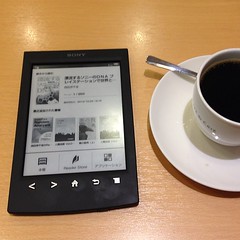
Hands-on with Sony's 'PRS T2' eReader

SONY Readerは二度死ぬ。PRS-T1は俺の不注意で、このPRS-T2はAmazon...
 (Photo credit: double-h_by_phone)
You don’t have to “read” between the lines to fathom that the niche eReader market is dominated by Barnes and Noble as well as Amazon. Recently, however, some companies have attempted to contest their monopoly by introducing some nifty EReaders - one such enterprise is Sony and here’s a hands-on appraisal of their new PRS T2 eReader:

Display

The PRS T2 showcases a 6-inch Pearl E-Ink (V220) capacitive screen with an 800 by 600-pixel resolution. The display is armed with Clear-Touch infrared knowhow, a 16-point gray scale configuration, and even an anti-glare sheathing for heightened functioning.

The visual effects are fairly good with decent text definition and illumination as well as negligible screen flickering between pages. However, some amounts of text shadows were evidenced. Thankfully the touchscreen functionality of the PRS T2 is smooth and comes with options like two-finger zoom and pinch (to regulate text dimensions).

Other Outer Features

The PRS T2 exudes a smart and functional look at first sight marked by its chrome-finish chassis. In the front, the screen is enveloped by an all-round bezel which contains 5 raised physical keys on its lower side – the keys being page back, page forward, home, previous screen, and menu controls.

The flanks and the rear of the device collectively house the battery along with options like the power switch, micro SD card slot, a reset control, and a micro USB port for data transfer and charging. Although the overall build is solid enough, the slightly tapered edges could pose a problem in handling the device.
The eReader’s 6.9 by 4.4 by 0.4-inch frame and 164-gram weight aid portability. The device is available in three shades - black, white, and wine red.

Reading Attributes

a) The PRS T2 offers 8 font dimensions as also 7 font styles to cater to your individual preferences.

b) You are provided with a host of menu options to assist reading and navigation. Notable options include settings to:


  • Intensify or reduce illumination.
  • Alter the direction and method of page turns (either right to left or left to right).
  • Navigate to a particular page.
  • View the table of contents for every document.
  • Crop a specified page. Search for specified portions of text.
  • Annotate text.
  • Share content with friends via Facebook.


c) The PRS T2 can work with and even translate all recognized global languages including Japanese, Greek, Korean, and Chinese.

d) 1 English dictionary and 6 international dictionaries are on board to help you quickly reference and parse difficult words.

e) There is a stylus provided as well; it can be used for annotation or page navigation. Sadly, no physical holder has been furnished for the stylus.

Hardware and Other Features

a) The PRS T2 boasts W-Fi capabilities allowing you to procure innumerable books and other titles from Sony’s online store. You can also assign favorites to a real-time public library and quickly download books from the same.

b) Sony have armed the eReader with 2GB of internal storage that can be extended to 32GB via the provided card slot.

c) The inbuilt battery, once fully charged, can sustain the PRS T2 for a touted 2 months of wireless use.

d) The lack of music capabilities jars and may deter certain buyers.

Conclusion

The PRS T2, in the final analysis, performs well and justifies its USD 129 price.


This guest post is brought to you by NATHAN BROWN of buyatt.com, a site that offers savings and current information on ATT Uverse.

Tuesday, March 12, 2013

3 iPad Mini keyboard cases you can't miss

People's initial interest in Microsoft Surface tablets may partly result from the engaging Type / Touch covers. Fortunately, there have been keyboard accessories for other mainstream tablets as well. If you are already an iPad Mini user, you won't miss the keyboard accessories / cases below.


1. Logitech Ultrathin Keyboard Cover for iPad mini


Price: $79.99
Thickness: 0.3 inch
Weight: 7.7 ounces

LOGITECH is almost the first company releasing keyboard case for iPad Mini after its previous success in iPad. Although the 7-inch size is not inherently type-friendly, the Logitech Ultrathin Keyboard Cover shows excellent performance in a slight and smart way. The keys and space are well defined and the typing experience is just perfect. As a competent keyboard, however, Logitech is not a good cover since it only protects the display, excluding the back and side edges.

2. Belkin Portable Keyboard Case for iPad Mini


Price: $79.99
Thickness: 0.3 inch thick
Weight: 7.7 ounces


Unlike LOGITECH's emphasis on optimal keyboard performance, Belkin is more like a traditional case integrated with a proprietary keyboard. A micro USB port, a power switch and a pairing button are along the right edge, making it as easy to use as other Bluetooth keyboards. As to the keyboard itself, however, it appears a bit awkward due to the relatively smaller keys, which is especially true when users type at a fast speed.


3. Zagg ZAGGkeys Mini 7


Price: $89.99
Thickness: 0.8-inch
Weight: 12.32-ounce

One obvious feature of Zagg keyboard case falls to its solid protection, which makes it even more reliable but less convenient to carry around. Its full QWERTY keyboard seems excellent whereas the fact is that customers can't press each key precisely every time as a result of the tight layout. When the cover is folded, the iPad mini won't sleep, either.

The keyboard cases for iPad Mini undoubtedly bring a lot of convenience to typing. However, people are inclined to buy a well-performed Bluetooth keyboard and a separate case. Another reason is that keyboard-integrated cases are typically come with two colors only (black and white).


Saturday, March 9, 2013

Txtr beagle: Why you shouldn't buy this "cheapest" reader

People have shown great interest in Txtr beagle, the cheapest eReader, for quite a few days, since it initially came out last October, with the amazing price ($13) and very limited features. After several months' eclipse, more news eventually come to us again. I am afraid many guys will feel deceived, however, if they know more about this "cheapest" title.


As we know, Txtr beagle was said to sell at $13 initially, which made it pretty fiery in a short time. But a recent report showed that Txtr beagle would cost $69 in the US, as much as the 69-dollar Kindle. I couldn't believe my eyes when I read this story a couple of days ago and thought that there must be something wrong. Then another post on The Digital Reader confirmed it. The budget price is exclusively offered for telecom users rather than the public. In all probability, this is only a method to extend the contract according to Nate Hoffelder from The Digital Reader.

In that case, the Txtr beagle is not an attraction any more. The 5-inch display may be pretty cute, but no more than Kobo Mini, I am afraid. The 5-book storage is not a merit, either, whereas 1000 books can be loaded to Kindle at one time. What's more, we can't transfer books to this eReader as easily as what other E-ink readers have done. When transferring books to Txtr, we will have to rely on an Android 4.0 (or up) device with the dedicated Android Txtr app installed. It's apparently impossible to directly purchase eBooks on Txtr itself.

Although it can last 1 year before needing to charge, I am afraid that won't be a lure to us anymore. When it's cheap enough, we may embrace the mentioned limitations. But when it comes at the same price as Amazon Kindle, how does it compete with Amazon's eBook-related services? Hope proper actions will be taken some time later.

Thursday, March 7, 2013

Asphalt 7: Heat 1.0.5 for Android

Asphalt 7: Heat 1.0.5 for Android - Follow this article to free download Asphalt 7: Heat 1.0.5 for Android.

Hit the speed of heat in the newest, fastest, most visually stunning edition of the famed Asphalt series. In here you can download Asphalt 7: Heat 1.0.5 for Android free.

Asphalt 7

Asphalt 7: Heat 1.0.5 for Android


Feature:
A FIRST-CLASS LINEUP
Drive 60 different cars from the world’s most prestigious manufacturers, like Ferrari, Lamborghini and Aston Martin, including the legendary DeLorean.
RACE ACROSS THE GLOBE
Gear up to race on 15 tracks set in real cities around the world, including brand new tracks in Hawaii, Paris, London, Miami and Rio.
CHALLENGE THE WORLD
The completely revamped multiplayer lets you take on up to 5 of your friends locally or online. Keep track of who’s the best with the new Asphalt Tracker that lets you compare stats, show off achievements and challenge rivals. You can also find new online opponents with the matchmaking system. Practice hard, because there are special events that will pit you against the best in the world!
YOUR WAY OR THE HIGHWAY
Play however you please with 6 different game modes packed with 15 leagues and 150 different races.
CUTTING EDGE GRAPHICS
Every car and track is more beautiful than ever thanks to graphics that push the limits of your device.
A RECORD OF SUCCESS
Acclaimed by both media and players, the Asphalt franchise has already attracted several million players worldwide.

Notes:
Requires Android 2.2 and up

Download:
Asphalt 7: Heat 1.0.5 for Android ICS (17,2 MB)
Asphalt 7: Heat 1.0.5 for Android JB (17,2 MB)
Asphalt 7: Heat 1.0.5 for Android on Google Play Store

Titanium Backup Pro 6.0.3.1 for Android

Titanium Backup Pro 6.0.3.1 for Android - Follow this article to download Titanium Backup Pro 6.0.3.1 for Android free.

Titanium Backup is the most powerful backup tool on Android, and then some. You can backup, restore, freeze (with Pro) your apps + data + Market links. This includes all protected apps & system apps, plus external data on your SD card. You can do 0-click batch & scheduled backups. Backups will operate without closing any apps (with Pro). You can move any app (or app data) to/from the SD card. You can browse any app's data and even query the Market to see detailed information about the app. In here you can download Titanium Backup Pro 6.0.3.1 for Android.

Titanium Backup Pro

Titanium Backup Pro 6.0.3.1 for Android


Feature:
[✔] Multiple backups per app
[✔] 0-click batch restore
[✔] Backup/restore SMS,MMS,calls,bookmarks,Wi-Fi AP as XML
[✔] Multi-user support for some apps! (eg: games)
[✔] Batch verification
[✔] Backup apps without closing them!
[✔] Create your own update.zip containing apps+data!
[✔] Restore individual apps+data from non-root ADB backups!
[✔] Restore individual apps+data from CWM backups!
[✔] Restore individual apps+data from TWRP backups!
[✔] Hypershell speed
[✔] Migrate system data across different ROMs
[✔] Market Doctor (relink apps to Market)
[✔] "Destroy all Market links" feature
[✔] Apps freezer (incl. batch support)
[✔] Market "auto updating" manager
[✔] Convert user apps <=> system apps
[✔] Encryption
[✔] Unlimited schedules
[✔] Sync to/from Dropbox (manual/scheduled)
[✔] Sync to/from Box (manual/scheduled)
[✔] Sync to/from Google Drive (manual/scheduled)
[✔] TB Web Server: download/upload your backups as a single ZIP on your computer
[✔] Load/Save a Filter and use it in Widgets/Schedules
[✔] Change the device's Android ID, restore it from a backup or after a factory reset
[✔] Protect backup against deletion
[✔] Send backup (to e-mail/cloud) and import it in 1 click
[✔] Backup→Verify→Un-install an app in one shot
[✔] Freeze/defrost/launch apps in a single click
[✔] CSV export any app DB (e-mail or Google Docs)
[✔] Brand the app with your name
[✔] Bloatware Melter (experimental)
[✔] Convert app data to/from faster WAL DB format
[✔] And more!
[✔] Dalvik cache cleaner
[✔] Integrate system app updates into ROM
[✔] Move apps into ROM
[✔] Integrate Dalvik cache system elements into ROM

Note:
Requires Android 1.5 and up.

Download:
Titanium Backup Pro 6.0.3.1 for Android (5,8 MB)
Titanium Backup Pro 6.0.3.1 for Android on Google Play Store

Minecraft - Pocket Edition 0.6.1 for Android

Minecraft - Pocket Edition 0.6.1 for Android - Follow this article to free download Minecraft - Pocket Edition 0.6.1 for Android.

Minecraft is about placing blocks to build things and going on adventures! Pocket Edition includes randomly generated worlds, multiplayer over a local Wi-Fi network, and Survival and Creative modes. You can craft and create with your friends anywhere in the world so long as you have hands spare and battery to burn. In here you can download Minecraft - Pocket Edition 0.6.1 for Android.

Minecraft

Minecraft - Pocket Edition 0.6.1 for Android


Feature:
- Food! Now you can cook and go hungry
- Swords! Bows! TNT!
- Chests
- Skeletons
- Spiders
- Beds
- Paintings
- Lots more!

Notes:
Requires Android 2.1 and up.

Download:
Minecraft - Pocket Edition 0.6.1 for Android (6,3 MB)
Minecraft - Pocket Edition 0.6.1 for Android on Google Play Store

Wednesday, March 6, 2013

SPB Shell 3D 1.6.3 for Android

SPB Shell 3D 1.6.3 for Android - Follow this article to free download SPB Shell 3D 1.6.3 for Android.

SPB Shell 3D is the next generation use interface. 3D reality for your phone. Add a new dimension to your Android! In here you can get SPB Shell 3D 1.6.3 for Android free.

SPB Shell 3D

SPB Shell 3D 1.6.3 for Android


Feature:
3D Home screen/launcher
Smart folders
3D widgets
Collection of panels and widgets

Notes:
Requires Android 2.1 and up.

Download:
SPB Shell 3D 1.6.3 for Android (11,7 MB)
SPB Shell 3D 1.6.3 for Android on Google Play Store

FPse 0.11.87 for Android

FPse 0.11.87 for Android - Follow this article to free download FPse 0.11.87 for Android.

FPse for Android is the fastest and most compatible PSone emulator for handheld devices.(also known as PSX or Playstation 1). FPse is able to render PSone games in high resolution by using OpenGL which gives outstanding graphics! In here you can download FPse 0.11.87 for Android.

FPse

FPse 0.11.87 for Android


Feature:
-High performance
-High compatibility
-High sound quality
-Real-time save states
-Audio track emulation (using .cue files)
-Force-feedback
-Dynamically loadable Overlay Pads
-Guncon emulation
-Analog Stick emulation
-Compatible with G-Sensor, Touchscreen and Hardware keys
-Supports .img, .iso, .bin, .cue, .nrg , .mdf and .Z disc image formats
-Full Support for IcontrolPAD, BGP100,Zeemote (via Bluez IME)
-OpenGL support via external plugin!

Notes:
Requires Android 2.1 and up

Download:
FPse 0.11.87 for Android (1,6 MB)
FPse 0.11.87 for Android on Google Play Store

Poweramp Music Player 2.0.8 build 525 for Android

Poweramp Music Player 2.0.8 build 525 for Android - Follow this article to download Poweramp Music Player 2.0.8 build 525 for Android free.

Poweramp is a powerful music player for Android. Follow twitter @Poweramp2 to get instant updates on app development progress, feature spotlight, theme sharing, take part in giveaways and even chances for free copies of Poweramp. In here you can free download Poweramp Music Player 2.0.8 build 525 for Android.

Poweramp


Poweramp Music Player 2.0.8 build 525 for Android


Feature:
- Plays mp3, mp4/m4a (including alac), ogg, wma*, flac, wav, ape, wv, tta, mpc, aiff
- 10 band optimized graphical equalizer for all supported formats, presets, custom presets
- separate powerful Bass and Treble adjustment
- stereo eXpansion, mono mixing, balance
- crossfade
- gapless
- replay gain
- plays songs from folders and from own library
- dynamic queue
- lyrics support, including lyrics search via musiXmatch plugin
- embed and standalone .cue files support
- support for m3u, m3u8, pls, wpl playlists
- OpenGL based cover art animation
- downloads missing album art
- 4 configurable widget types
- configurable lock screen with optional Direct Unlock
- headset support, automatic Resume on headset and/or BT connection (can be disabled in settings)
- scrobbling
- tag editor
- visual themes, including support for external/3rd party skins
- fast library scan
- high level of customization via settings

Notes:
Requires Android 2.1 and up.

Download:
Poweramp Music Player 2.0.8-build-525 for Android (15,9 MB)
Poweramp Music Player 2.0.8-build-525 for Android on Google Play Store

Tuesday, March 5, 2013

WhatsApp 2.9.1547 for Android

WhatsApp 2.9.1547 for Android - Follow this post to free download WhatsApp 2.9.1547 for Android.

WhatsApp Messenger is a smartphone messenger available for Android, BlackBerry, iPhone, Windows Phone and Nokia phones. WhatsApp uses your 3G or WiFi (when available) to message with friends and family. Switch from SMS to WhatsApp to send and receive messages, pictures, audio notes, and video messages. In here you can download WhatsApp 2.9.1547 for Android free.


WhatsApp 2.9.1547 for Android


Feature:
  • NO HIDDEN COST: Once you and your friends download the application, you can use it to chat as much as you want. Send a million messages a day to your friends for free! WhatsApp uses your Internet connection: 3G/EDGE or Wi-Fi when available.
  • MULTIMEDIA: Send Video, Images, and Voice notes to your friends and contacts.
  • GROUP CHAT: Enjoy group conversations with your contacts.
  • NO INTERNATIONAL CHARGES: Just like there is no added cost to send an international email, there is no cost to send WhatsApp messages internationally. Chat with your friends all over the world as long as they have WhatsApp Messenger installed and avoid those pesky international SMS costs.
  • SAY NO TO PINS AND USERNAMES: Why even bother having to remember yet another PIN or username? WhatsApp works with your phone number, just like SMS would, and integrates flawlessly with your existing phone address book.
  • NO NEED TO LOG IN/OUT: No more confusion about getting logged off from another computer or device. With push notifications WhatsApp is ALWAYS ON and ALWAYS CONNECTED.
  • NO NEED TO ADD BUDDIES: Your Address Book is used to automatically connect you with your contacts. Your contacts who already have WhatsApp Messenger will be automatically displayed.
  • OFFLINE MESSAGES: Even if you miss your push notifications or turn off your phone, WhatsApp will save your messages offline until you retrieve them during the next application use.
  • AND MUCH MORE: Share location, Exchange contacts, Custom wallpaper, Custom notification sounds, Landscape mode, Precise message time stamps, Email chat history, Broadcast messages and MMS to many contacts at once and much much more!

Notes:
Requires Android 2.1 and up.

Download:
WhatsApp 2.9.1547 for Android on Google Play Store

WeChat 4.5 for Android

WeChat 4.5 for Android - Follow this post to download WeChat 4.5 for Android free.

WeChat is the complete mobile communication and private social networking app. Free, cross-platform, and full-featured, WeChat is the best way to keep in touch with everyone you care about.  In here you can download WeChat 4.5 for Android for free.

WeChat

WeChat 4.5 for Android


Feature:
  • Free cross-platform individual and group messaging with text, voice notes, images, videos, location data, and more.
  • Free HD video calls.
  • Secure, locally stored message histories always accessible offline.
  • NO ADS ANYWHERE!
  • Private, group-based photo-sharing social network.
  • Incredibly easy friend adding by shaking your phones together, scanning QR codes, syncing with your phone contacts, sharing IDs, or using location-based services.
  • Blazingly fast registration with your phone number.
  • Web WeChat: chat on WeChat from your PC through the browser. See http://web.wechatapp.com for details.
  • Support for 18 languages including English, Chinese, Thai, Vietnamese, Indonesian, and Portuguese.
  • Download special emoticons.
  • Sync your Moments photos to Twitter.

Notes:
Requires Android 2.1 and up.

Download:
WeChat 4.5 for Android on Google Play Store

Monday, March 4, 2013

How do you like Kindle Paperwhite Mini?

Amazon Kindle Paperwhite has drawn a lot of attraction from the market since its debut last year. As part of the discussion, people have begun to talk about other possibilities, such as a Mini version of Paperwhite.


Those who are used to reading on their phone, maintain that a 5-inch Paperwhite, or a bit smaller one, would fit in the hand better. It would also be much easier to carry aroud and enable reading on the go.

A fair number of users hold the opposite opinion. They admit it is rather cute but can't stand reading on a phone-like eReader for a long time. Turning pages constantly isn't a good experience, either. If you don't have wrist problems or very small hands, you will not find it hard to hold the regular Paperwhite in one hand.

The people who desire a Paperwhite Mini primarily compare it with the absorbing Kobo Mini, which is lighter and smaller than Paperwhite. In addition, the Kobo Mini is not the only 5-inch reader when it comes to small-size. SONY PRS-300 is another Mini E-ink reader. However, this device is no longer available on the market.


There is bound to be more improvements on Kindle Paperwhile in the future. Will Amazon launch a mini Paperwhite? We will have to wait and see.

LINE 3.0.2 for Android

LINE 3.0.2 For Android - In here you can free download LINE 3.0.2 For Android. Follow this articel and happy download.

LINE has been ranked no. 1 in the free app category in 24 countries including Japan, Taiwan, Russia, Hong Kong, Thailand, Singapore, Malaysia, Macau, Switzerland, Saudi Arabia, United Arab Emirates and more! LINE is a new communication app which allows you to make free voice calls and send free messages whenever and wherever you are, 24 hours a day!

LINE

LINE 3.0.2 For Android


Features:
  • New Sticker Shop! Find all your favorite characters here!
  • Hilarious and fun stickers featuring famous characters from all over the world can be found here!
  • Free voice calls!
  • All LINE smartphone users can enjoy free high quality voice calls, wherever and whenever you are. Talk for as much as you want and best of all, it’s free!
  • Free also between Android and iPhone
  • Free for international calls too

Notes:
  • As with any other apps, data transfer fees may be incurred. We therefore recommend using the services on an unlimited mobile price plan.
  • Also, voice calls can be used between smartphone users only.
  • Technical Info for Seamless Usage
  • Android Devices: We recommend installing Android OS 2.1 or higher

Download:
LINE 3.0.2 Android on Google Play Store